Give Yourself Time
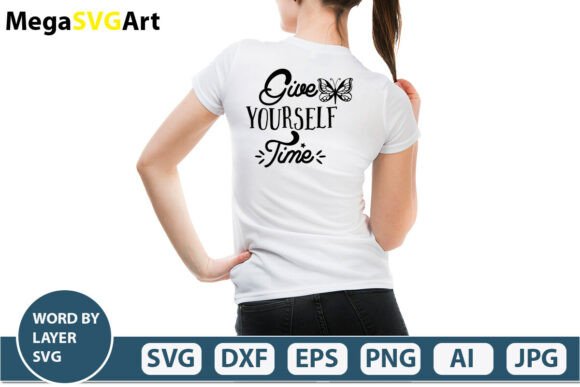
Give Yourself Time is a digital design resource consisting of layered SVG files and complementary vector and raster formats, intended for personal crafting, DIY projects, and digital design work. It is not a physical product—only a downloadable .zip file containing editable and ready-to-cut assets. The phrase “Give Yourself Time” appears as stylized text, segmented by letter or word layer, enabling precise control over spacing, sequencing, and visual hierarchy in cutting and design software.
What You’ll Receive in the Download
The package includes six distinct file types, each serving a specific technical purpose:
- .Ai file: Adobe Illustrator source file—fully editable with layers, paths, and typography intact.
- .SVG file: Word-by-layer SVG cut file—optimized for Cricut Design Space, Silhouette Studio, and other web-based cutting platforms.
- .PNG file: 300 DPI, transparent background—suitable for digital overlays, print layouts, or mockups where vector editing isn’t required.
- .EPS file: Legacy vector format—compatible with older versions of Illustrator and some print production workflows.
- .DXF file: Universal vector exchange format—commonly used with CNC machines, laser cutters, and CAD software.
- .JPEG file: High-resolution preview image—useful for reference or quick placement in non-vector applications like Photoshop or Canva.
All files are designed to maintain consistent proportions and alignment across formats, though minor rendering differences may occur depending on software interpretation—especially with stroke weights, transparency handling, or text conversion.
Why Someone Might Consider This Design
People often seek layered text designs like Give Yourself Time for projects that emphasize intentionality, mindfulness, or self-compassion. Common use cases include wall decals, journaling supplies, greeting cards, fabric transfers, vinyl signage, and classroom displays. Because the letters or words are separated into individual layers, users can stagger timing in animated SVGs, apply unique colors or textures per segment, or sequence cuts for multi-material projects (e.g., stacking vinyl layers).
The phrase itself resonates in wellness, education, and therapeutic contexts—making it relevant for counselors, teachers, life coaches, and hobbyists building affirming environments. Its simplicity also supports accessibility: clean lines, high contrast, and scalable vectors ensure legibility at various sizes.
Practical Benefits and Realistic Tradeoffs
One key benefit is flexibility. With multiple file formats, users aren’t locked into a single platform. A Silhouette user can import the SVG; an Illustrator professional can refine kerning and path direction in the .Ai file; a small business owner preparing for print can rely on the EPS or high-DPI PNG.
However, this versatility comes with expectations. The files assume baseline familiarity with vector editing or cutting software. Beginners may need to learn how to ungroup layers, adjust registration marks, or convert text to outlines—steps not included in the download. There is no instruction manual, video tutorial, or customer support bundled with the purchase.
Also, because it’s a static design—not a font or parametric template—customization beyond scaling, recoloring, or reordering layers is limited. Changing the wording, adding icons, or altering typeface requires vector editing skills and compatible software. Users expecting plug-and-play customization without learning curve should adjust expectations accordingly.
When This Is a Strong Fit
Give Yourself Time is well-suited for individuals who already own or plan to use compatible software and have a defined project in mind. For example:
- A teacher creating layered bulletin board letters to reinforce social-emotional learning concepts.
- A small-batch crafter producing hand-cut vinyl affirmations for resale on Etsy or at local markets.
- A graphic designer building a branded workshop toolkit and needing consistent, scalable assets across print and digital deliverables.
- A Cricut user looking for a ready-to-cut phrase with built-in layer separation—avoiding time spent manually breaking apart text in Design Space.
In these cases, the value lies in time saved on asset preparation—not in novelty or automation.
When Alternatives May Be Worth Considering
If your goal is rapid iteration across many phrases, a licensed font family with stylistic alternates or OpenType features may offer more flexibility than a single-word SVG pack. Fonts allow dynamic text entry, automatic spacing adjustments, and seamless integration into documents or websites.
If you’re new to cutting machines and want guided setup, subscription-based design libraries (like Cricut Access or Silhouette Studio’s built-in store) provide tutorials, pre-tested materials settings, and version updates—features absent from standalone digital downloads.
If your project requires licensing for commercial redistribution—for instance, embedding the design into a printable planner sold to others—you’ll need to verify usage rights. Most digital SVG downloads, including this one, permit personal and small-business physical product creation but prohibit reselling the files themselves or using them as part of a digital template kit. Always review the license terms before purchasing.
Making a Practical Decision
To determine whether Give Yourself Time aligns with your needs, ask yourself three questions:
- Do I have—or am I willing to learn—the software needed to open and modify these files? If you only use Cricut Design Space and don’t plan to edit layers outside the browser, the SVG alone may suffice—but the .Ai and .EPS files won’t add value unless you expand your toolkit.
- Is my project timeline constrained enough that skipping manual text breakdown is worthwhile? Layered SVGs eliminate the step of converting text to paths and separating characters—a modest time saver for frequent users, but less impactful if you cut infrequently.
- Does the phrase match both my message and my audience’s expectations? While “Give Yourself Time” carries broad resonance, it may not suit contexts requiring urgency, authority, or technical precision (e.g., engineering documentation or emergency signage). Evaluate tone fit alongside technical compatibility.
No single digital design file serves every need. What makes Give Yourself Time useful is its consistency, format coverage, and intentional layering—not uniqueness or automation. Its role is functional: to reduce repetitive setup steps for those already engaged in vector-based making.
Before downloading, confirm your software versions support the included formats—especially DXF and EPS, which sometimes require legacy mode or plugin activation. And remember: because it’s a digital download, there’s no physical proof of purchase or shipping delay—but also no option to return or exchange once the file is accessed.