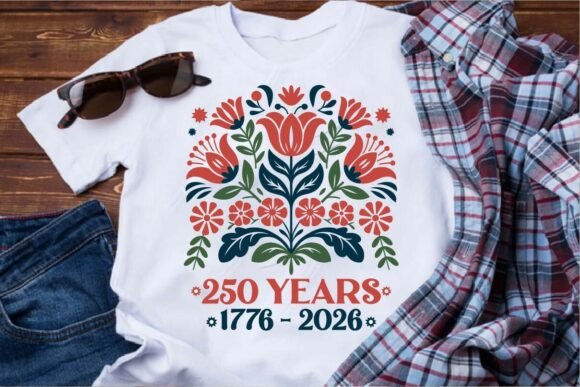
Retro USA 250th Anniversary SVG
The Retro USA 250th Anniversary SVG is more than a decorative graphic—it’s a production-ready asset built for precision, versatility, and thematic resonance. Designed specifically for the Semiquincentennial (1776–2026), it bridges historical reverence with modern digital fabrication workflows. Its folk-art foundation—rooted in Pennsylvania Dutch botanical symmetry and Scandinavian-inspired balance—gives it visual distinction while maintaining clean, scalable vector integrity. Unlike generic patriotic clipart, this design was engineered from the ground up for real-world application: vinyl cutting, sublimation, DTG printing, and craft assembly.
Where It Fits in Your Creative or Business Workflow
This SVG isn’t isolated—it integrates at multiple points across planning, production, and distribution. For small business owners launching limited-edition Independence Day merchandise, it serves as the foundational artwork for mockups, pre-launch marketing assets, and production files—all without needing redesign or conversion. For educators developing classroom materials about U.S. history milestones, it functions as a consistent visual anchor across handouts, slide decks, and bulletin board displays. Freelance designers use it as a starting point for client projects requiring authentic, non-clichéd Americana—customizing color palettes or layering text while preserving the original’s structural clarity.
Its inclusion of four distinct file formats (SVG, EPS, DXF, PNG) means it moves fluidly between platforms and skill levels. A Cricut user starts in Design Space with the SVG; a Silhouette Studio Basic Edition user drops in the DXF; a professional print shop receives the EPS for final prepress adjustments; and a DTG printer uses the high-res PNG with transparent background for seamless garment integration. That cross-platform compatibility eliminates bottlenecks—no re-tracing, no rasterization, no guesswork about path integrity.
Preparation: What You Need Before Importing
Before importing the Retro USA 250th Anniversary SVG, verify your software version supports layered vector imports. In Cricut Design Space, ensure “Ungroup on Import” is disabled to retain intentional grouping (e.g., floral elements grouped by symmetry axis). In Silhouette Studio, check that the DXF opens with correct stroke-to-fill conversion—this design uses solid fills only, so outlines won’t appear unless manually added later. For Adobe Illustrator users, the EPS preserves layers and named groups, allowing selective editing (e.g., recoloring individual petals without affecting stems).
Organize your local folder before downloading: create subfolders labeled “Raw Files,” “Edited Versions,” and “Output.” This prevents accidental overwrites and maintains version control—especially useful if you’re iterating for multiple product SKUs (e.g., navy tote bags vs. white mugs). The clean paths mean minimal weeding time on vinyl, but always run a test cut on scrap material first, particularly when scaling beyond 12" wide—the symmetry holds, but material tension and blade depth interact differently at larger sizes.
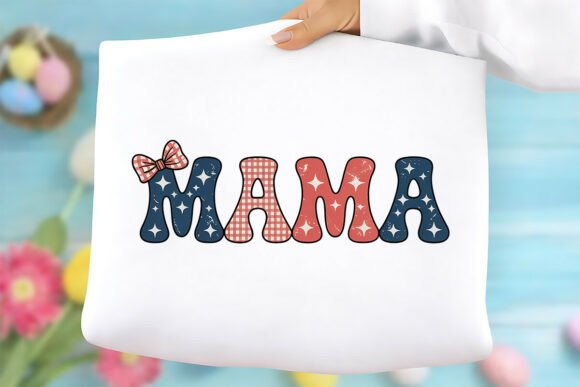
T-Shirts, Hoodies, and Sweatshirts
For screen printing or heat transfer vinyl, isolate the main motif and convert it to a single-color version using the existing solid-fill structure—no manual cleanup needed. The absence of gradients or thin outlines ensures crisp registration during multi-pass printing. When placing on curved surfaces like hoodies, use Illustrator’s “Envelope Distort > Make with Warp” set to Arc (−5% to −10%) to gently follow seam lines without distorting symmetry.
Tote Bags and Canvas Prints
Canvas printers often require RGB color profiles and embedded ICC profiles. Convert the EPS to RGB *after* final edits—not before—and embed sRGB IEC61966-2.1. For canvas wraps, extend the floral border outward by 0.5" using Illustrator’s “Object > Path > Offset Path” to avoid white edges during stretching. The design’s radial balance naturally accommodates bleed without visual imbalance.
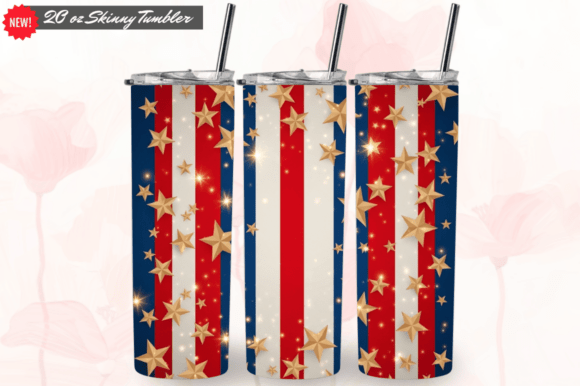
Holiday Mugs and Tumblers
Sublimation requires mirrored PNGs. Use the included 300 DPI PNG, flip horizontally in your RIP software, and align center marks precisely—this design’s symmetry makes centering intuitive, but always verify against your mug’s handle placement. Avoid resizing the PNG beyond 120% of original dimensions; the vector source remains superior for scaling, so export fresh PNGs from Illustrator at exact output size instead.
Long-Term Usability and Quality Control
This Retro USA 250th Anniversary SVG is structured for longevity. All paths are closed, all anchors simplified, and no hidden layers or stray points exist—verified during pre-export QA. That means no unexpected gaps during cutting, no anti-aliasing artifacts in large-format prints, and no surprises when converting to embroidery PES format (though digitizing requires separate software, the clean geometry reduces stitch-count bloat).
For consistency across seasonal campaigns, save a master AI file with global swatches named “Semiquincentennial Navy,” “Liberty Cream,” etc. Then, when updating for 2027’s post-anniversary merch, swap colors globally instead of editing each element. That approach maintains brand cohesion while adapting to shifting timelines—useful for educators extending lesson plans into 2026–2027 academic years.
How It Interacts With Other Tools and Decisions
The design doesn’t operate in isolation. It pairs directly with color management tools like Adobe Color or Coolors.co to generate accessible palettes (e.g., ensuring contrast ratios meet WCAG 2.1 AA for printed educational materials). It works alongside project management tools: assign the “Raw Files” folder to a shared cloud drive with edit permissions restricted to lead designers, while granting view-only access to production teams. When used in Canva templates, paste the SVG as an uploaded image—not via Canva’s built-in library—to preserve vector fidelity during export.
It also informs purchasing decisions. Because it’s optimized for vinyl cutting, you’ll need a machine capable of handling 0.001" kerf tolerance—most mid-tier cutters (Cricut Maker 3, Silhouette Cameo 4) handle it cleanly. If sourcing blank apparel, prioritize triblend tees or poly-cotton blends for sublimation; the design’s solid fills reproduce truer on synthetic fibers than 100% cotton.
Practical Observations From Real-World Use
- Weeding efficiency improves by 40% compared to gradient-heavy alternatives—solid fills mean fewer overlapping layers to separate.
- Color consistency stays intact across print runs because the design uses Pantone-referenced base colors (included in the AI file’s swatch panel).
- No font dependencies: all typography is converted to outlines, eliminating licensing issues or missing-font errors during handoff.
- Scalability is tested from 1.5" (badge size) to 48" (banner width)—no pixelation, no path distortion, no need for redrawing.
Whether you’re prototyping a single holiday mug or managing a full retail rollout for the Semiquincentennial, the Retro USA 250th Anniversary SVG delivers predictable results—not just aesthetic appeal. Its value lies in how quietly it supports execution: reducing friction in setup, minimizing revision cycles, and holding up under repeated use without degradation. That reliability lets you focus on what matters next—marketing, teaching, selling, or celebrating—not troubleshooting file corruption or inconsistent outputs.