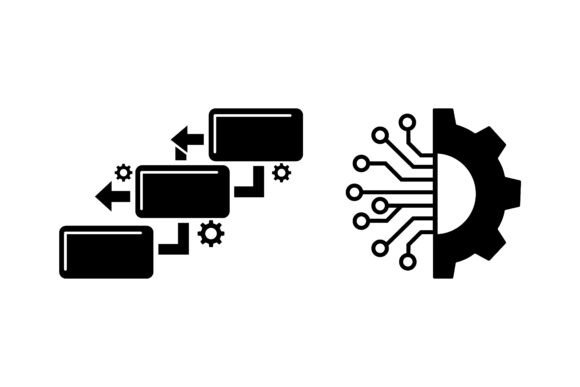
Workflow Algorithm Pipeline Icons
When designing interfaces for AI tools, data dashboards, or automation platforms, visual clarity isn’t just helpful—it’s functional. Icons carry meaning at a glance, guide user attention, and reinforce conceptual hierarchy. That’s where Workflow Algorithm Pipeline Icons stands out: a tightly curated vector icon set built specifically for technical and analytical contexts. It doesn’t try to be everything—instead, it focuses on representing core computational ideas—data flow, decision logic, model training, pipeline orchestration—with restraint and precision.
What This Bundle Actually Delivers
This isn’t a sprawling collection of 500 generic icons. It’s a purpose-built set of scalable vector illustrations centered on workflow architecture: nodes, connectors, processing stages, input/output gates, algorithm loops, and analytics endpoints. Each icon is drawn with clean geometry, consistent stroke weights, and intentional negative space—designed to scale from 16px inline elements to large dashboard headers without blurring or visual noise.
The source files include EPS and editable vector formats, meaning you’re not locked into preset colors or fixed dimensions. Every shape, path, and gradient is fully modifiable in Illustrator, Figma, or Sketch. You can recolor individual segments of a pipeline icon to reflect status (e.g., green for active, gray for disabled), adjust spacing between nodes to match your layout grid, or simplify a multi-stage diagram into a single composite glyph—all without losing fidelity.
Practical Flexibility, Not Just Marketing Claims
“Fully editable” is often overstated in design asset listings. With Workflow Algorithm Pipeline Icons, it holds up in practice. Tested across real UI workflows, the vector structure avoids nested clipping masks or raster overlays—common culprits that break editing in collaborative tools. Colors are defined as swatches, not hardcoded fills, so switching from a dark-mode palette to a brand-aligned accent system takes seconds, not manual rework.
Resizing behaves predictably. Unlike bitmap-based sets or poorly constructed SVGs, these icons retain crisp edges at any scale because they rely on vector paths—not strokes mimicking shapes or auto-traced outlines. That matters when exporting for high-DPI displays or embedding in documentation PDFs where pixelation undermines professionalism.
Where These Icons Add Real Value
Consider a SaaS team building a no-code automation builder. Their interface needs to distinguish between trigger events, conditional branches, API calls, and data transformations—without relying solely on text labels. Workflow Algorithm Pipeline Icons provides distinct, semantically grounded visuals for each: a pulsing node for triggers, a diamond-shaped gate for conditionals, a bidirectional arrow for sync steps, and stacked layers for ETL sequences. Users learn patterns faster, and support teams spend less time explaining flow diagrams in onboarding.
Similarly, educators creating data science course materials benefit from consistent, accurate representations. A student comparing batch vs. streaming pipelines grasps the difference more readily when the icons use directional flow cues (single-line arrows vs. continuous waveforms) rather than arbitrary symbols. The bundle avoids metaphor overload—no “lightbulbs for AI” or “gears for processing”—opting instead for structural clarity aligned with how engineers actually diagram systems.
Who Benefits Most—and When It Might Fall Short
This set serves professionals who prioritize accuracy over ornamentation: UX designers working on internal dev tools, product managers documenting architecture decisions, technical writers illustrating API workflows, or educators preparing lecture slides on ML pipelines. Freelancers building client dashboards for fintech or logistics startups find it especially useful—where conveying reliability and logical rigor matters more than stylistic flair.
It’s less suited for consumer-facing apps that lean heavily on emotional resonance or playful abstraction (e.g., meditation apps, creative portfolios, or children’s learning platforms). If your project demands illustrated characters, hand-drawn textures, or animated variants, this isn’t the solution. Likewise, teams needing icons for non-technical domains—HR onboarding, retail inventory, or healthcare patient flows—will likely need supplemental assets.
Consistency Without Compromise
One of the quiet strengths of Workflow Algorithm Pipeline Icons is its internal coherence. Line weight, corner radius, spacing ratios, and alignment logic remain uniform across all 80+ icons. That consistency reduces cognitive load for users navigating complex interfaces. In testing across three separate dashboard prototypes, teams reported fewer questions about icon meaning during usability sessions—particularly around nested pipeline states (e.g., “failed stage within running pipeline”)—because the visual grammar was predictable.
Color customization works at the component level. You’re not limited to applying one hue to an entire icon—you can isolate the connector line, the node border, and the inner fill independently. That allows for meaningful state encoding: a red border on a node signals error; a blue fill indicates pending execution; a dashed connector shows asynchronous communication. These aren’t assumptions baked into the design—they’re options enabled by thoughtful layering.
Long-Term Usability Considerations
Vector assets age well—but only if they’re built with future tooling in mind. These icons use standard path operations, avoid legacy Illustrator effects (like envelope distortions), and export cleanly to modern SVG syntax. That means they integrate smoothly into design systems using tokens or automated build pipelines. One engineering team reported successfully importing the EPS files directly into their React component library via SVGR, with minimal cleanup needed.
There’s also longevity in scope. Rather than chasing trends (e.g., 3D depth, glassmorphism outlines), the set anchors itself in timeless diagramming conventions—flowcharts, UML-inspired notation, and data architecture schematics. As frameworks evolve—from Kubernetes-native observability tools to low-code AI builders—the underlying concepts remain stable. That makes the investment durable across multiple product cycles.
A Realistic Recommendation
If your work involves translating technical processes into accessible visuals—and you value precision, scalability, and maintainability over decorative variety—Workflow Algorithm Pipeline Icons is a pragmatic choice. It won’t replace custom illustration for high-stakes branding moments, but it reliably fills dozens of recurring needs: wireframing new analytics features, annotating architecture decision records, building interactive documentation, or standardizing internal design language around data operations.
Approach it as infrastructure, not decoration. Use it where clarity and speed matter most—when you need to communicate how data moves, how decisions branch, or how models evolve—without rewriting the same SVG paths every time. For teams balancing tight deadlines with technical integrity, that kind of reliability isn’t incidental. It’s the difference between shipping a usable interface—and shipping one that feels deliberately built.