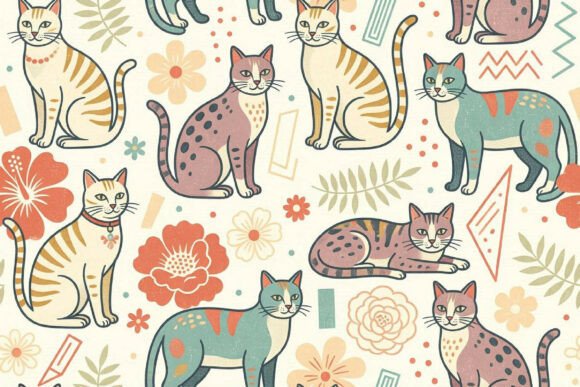
Free Pastel Background Digital Paper
Pastel tones bring calm, warmth, and quiet sophistication—whether you’re designing a greeting card, laying out a classroom handout, or building a brand mood board. Free Pastel Background Digital Paper is a downloadable set of high-resolution digital textures that mimic the soft grain and subtle texture of real paper—but in gentle, printable pastel hues. Each file is a JPG at 3000 × 2000 pixels—large enough for crisp prints up to 10" × 6.7" at 300 DPI, and flexible enough for digital use across devices and platforms.
Why This Matters—Depending on Who You Are
What makes this resource valuable isn’t just its color palette—it’s how it fits into real workflows. A graphic designer might scan it for texture depth before finalizing a client mockup. A teacher may drop it behind student worksheets to reduce visual fatigue during long reading sessions. A small business owner launching an Etsy shop could use it as a clean, cohesive backdrop for product photos—no studio lighting needed.
For Beginners: Simplicity That Builds Confidence
If you're just learning Canva, Photoshop, or even Google Slides, working with pre-sized, ready-to-use backgrounds removes friction. No need to adjust resolution, wrestle with layers, or second-guess color harmony. Just drag, drop, and start layering text or illustrations. The 3000 × 2000 pixel size works seamlessly in most free and paid design tools—and because it's a JPG (not PSD or layered format), there’s no learning curve around blending modes or opacity settings. It’s a low-risk way to experiment with tone, contrast, and composition without investing time in custom creation.
For Educators & Trainers: Calm Visuals for Focused Learning
Research suggests softer colors can support attention and reduce cognitive load—especially for younger learners or neurodiverse students. Many educators use pastel backgrounds for printable flashcards, editable lesson slides, or behavior charts. Because these files are print-ready, they hold up well on standard copiers and home printers. One middle school art teacher told us she uses them as base layers for student collage projects—scanned, printed, cut, and reassembled—so kids explore texture and scale before touching digital tools.
For Freelancers & Small Business Owners: Speed Without Sacrifice
When you’re juggling client revisions, social posts, and invoices, every minute counts. Having a library of consistent, on-brand backgrounds means less time sourcing or generating assets from scratch. A wedding planner might use a blush-toned background for invitation suite mockups; a wellness coach could apply a sage-green version behind quote graphics for Instagram. Since each file downloads instantly as a ZIP after purchase—and contains only JPGs—there’s no waiting, no subscription, and no software lock-in.
For Print-Centric Creators: Texture Meets Practicality
Digital paper textures add tactile nuance that flat solid colors lack—especially important if your end goal is physical output. These files include subtle grain and soft edge variation, mimicking handmade or artisanal stock. That matters when printing greeting cards, journal inserts, or boutique packaging. Keep in mind: screen colors vary. What looks lavender on your laptop may shift slightly when printed—so always do a test print first, especially for color-critical work. Most users find the variance minimal and manageable with basic calibration or by using sRGB color profiles.
What You’ll Actually Get—and What You Won’t
After completing your purchase, you’ll receive a ZIP file containing all pastel background JPGs—no hidden extras, no upsells, no login wall. There’s no physical item, no shipping, and no recurring fee. You own the license to use these files in personal and commercial projects—including client work, digital products, and small-batch printed goods—as long as you don’t resell or redistribute the files themselves.
This isn’t a template pack with editable text boxes or pre-built layouts. It’s not a Procreate brush set or a vector pattern library. It’s intentionally focused: clean, high-res, pastel-toned digital paper textures—designed to serve as foundations, not finished designs.
How to Tell If It Fits Your Needs Right Now
Ask yourself:
- Do you need something fast? If you’re building a presentation tonight or uploading social media assets by noon tomorrow, these files eliminate the “what background should I use?” delay.
- Are you prioritizing consistency? Using the same set across multiple projects—like email headers, printable planners, and slide decks—creates subtle visual continuity without demanding advanced branding knowledge.
- Is print quality non-negotiable? At 3000 × 2000 pixels, these files scale cleanly to common print sizes (A4, Letter, 5×7", 8×10") without pixelation—even on mid-tier inkjet printers.
- Do you value flexibility over complexity? They work in Canva, PowerPoint, Affinity Designer, GIMP, Keynote, and even basic photo editors like Preview or Photos. No plugins, no fonts, no dependencies.
On the other hand, if you need transparent PNGs for overlay work, vector-based repeats for large-format printing, or AI-generated variations per hue—this set won’t cover those needs. And while the colors are thoughtfully balanced, they aren’t Pantone-matched or calibrated for industrial print workflows.
A Note on Color & Real-World Use
Your monitor displays color differently than a printed page does—and that’s normal. Every screen has unique brightness, gamma, and white-point settings. A mint background may look cooler on a MacBook Pro but warmer on a budget Windows laptop. That’s why we recommend:
- Using sRGB color mode in your editing software (most default to this).
- Doing a quick test print on your intended paper type—especially if color accuracy affects your message (e.g., baby shower invites, brand guidelines).
- Adjusting brightness or contrast slightly in your editor if needed—these JPGs respond well to minor tweaks without degrading quality.
This transparency isn’t a limitation—it’s part of responsible digital design. Knowing how screens and printers interpret color helps you plan better, communicate expectations clearly with clients or students, and avoid surprises down the line.
Final Thought: Tools Should Serve Your Work, Not Define It
A great background doesn’t make your idea stronger—but it can help your idea land more gently, read more clearly, or feel more intentional. Whether you’re sketching a new logo concept, preparing a parent newsletter, or prototyping a children’s book layout, Free Pastel Background Digital Paper offers quiet utility. It’s not flashy. It doesn’t demand attention. But when used well, it quietly supports what matters most: your message, your audience, and the work only you can do.