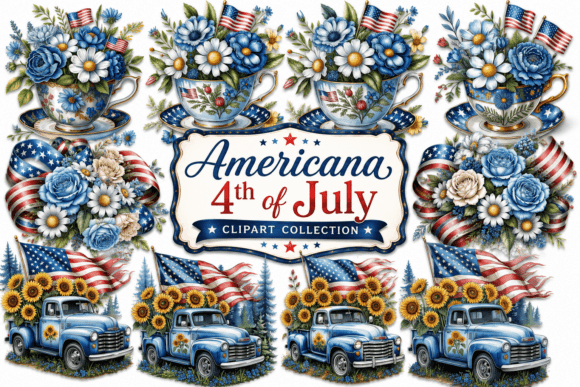
Whimsical 4th of July Clipart: Creative Freedom with Purpose-Built Design Assets
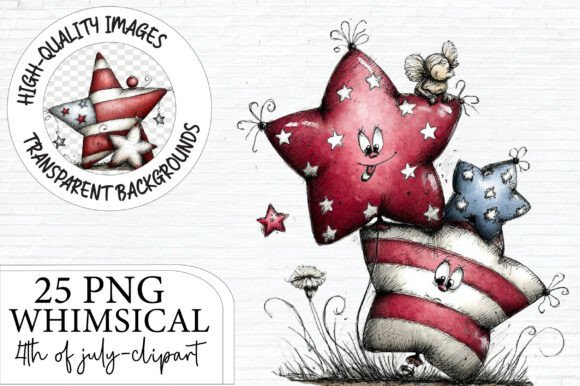
Whimsical 4th of July clipart isn’t just decorative—it’s a strategic creative tool. Think beyond fireworks and eagles: imagine hand-drawn star-spangled cupcakes, retro-style fireworks bursting into confetti swirls, playful Uncle Sam hats tilted over smiling watermelons, or minimalist bald eagles wearing tiny sunglasses. This is the kind of expressive, personality-driven visual language that resonates today—not as nostalgia alone, but as intentional, brand-aligned storytelling for modern celebrations.
Why Whimsy Matters More Than Ever in Holiday Design
Consumers—especially those aged 25 to 45—are increasingly drawn to authenticity over polish. A perfectly symmetrical vector eagle may look crisp, but it rarely sparks joy the way a slightly lopsided, hand-sketched firework does. That subtle imperfection signals human effort, warmth, and care—qualities that align with how people now choose products, brands, and even greeting cards. Whimsical 4th of July clipart meets this shift head-on: it balances patriotic symbolism with approachability, making Independence Day feel inclusive, lighthearted, and deeply personal.
This matters for creators who design for real audiences—not just algorithms. Whether you're a small-batch apparel maker launching a limited-run t-shirt collection, an educator crafting summer classroom materials, or a wedding planner designing custom picnic invitations, whimsy helps your work stand out without shouting. It invites engagement rather than demanding attention.
What You’ll Actually Receive—and Why Each Detail Serves Your Workflow
When you choose a curated set like Whimsical 4th of July Clipart, you’re not just buying images—you’re investing in production-ready assets designed for today’s digital and print ecosystems:
- 25 PNG files: Enough variety to avoid repetition across product lines or campaigns—think flags with different textures, animals in patriotic gear, and abstract star motifs—all unified by tone and style.
- 12×12 inch dimensions at 300 DPI: This isn’t arbitrary sizing. It ensures sharp detail whether scaled down for a sticker or enlarged for a 24×36 poster. Print-on-demand platforms (like Printful or Gelato) and sublimation printers rely on consistent resolution—this eliminates guesswork during upload and reduces rework.
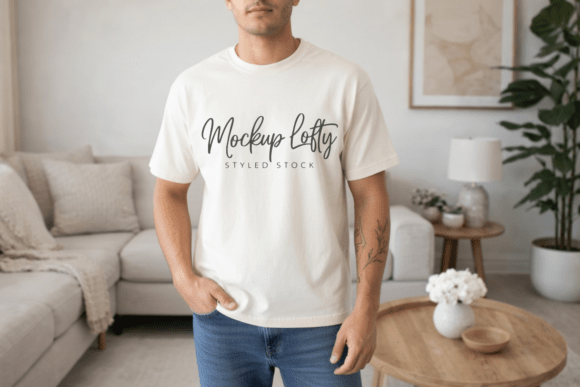
- Transparent backgrounds: No more wrestling with clipping masks or background removal tools. Drop any element directly onto a navy shirt mockup, a kraft-paper invitation, or a gradient social media banner—and it integrates cleanly.
- Cross-application readiness: These files work equally well in Canva for quick social posts, Adobe Illustrator for precise vector adjustments, or Cricut Design Space for vinyl cutting. That flexibility saves hours per project—time that adds up when managing multiple seasonal launches.
Real-World Use Cases: From Side Hustle to Scalable Business
A freelance graphic designer used six pieces from a similar whimsical holiday pack to create a cohesive line of “Backyard BBQ” greeting cards sold through Etsy. Because each illustration shared the same color palette and linework weight, customers recognized the series instantly—even without branding visible on thumbnails.
A school district’s communications team repurposed three whimsical fireworks elements into editable Google Slides templates for summer reading program announcements. Teachers copied slides into their own decks, added student names, and printed them as take-home flyers—no design training required.
A POD entrepreneur launched a “Patriot Pals” mug collection featuring illustrated animals holding mini flags. The transparent PNGs allowed clean placement on curved ceramic surfaces using standard sublimation heat presses—no pixelation, no alignment issues.
These aren’t hypotheticals. They reflect how professionals are using high-quality, stylistically consistent clipart not as filler—but as foundational building blocks for scalable, on-brand output.
Color Realism and Technical Expectations: Setting Accurate Boundaries
Here’s something often overlooked: screen color ≠ print color. That vibrant red in your design software may appear deeper, duller, or slightly orange once printed on cotton fabric or ceramic. This isn’t a flaw in the clipart—it’s physics. Monitors use RGB light emission; printers use CMYK or dye-sublimation inks interacting with physical substrates. Even paper brightness or mug glaze affects final appearance.
The included color disclaimer isn’t boilerplate—it’s professional courtesy. Smart creators test prints early: order one sample mug or one fabric swatch before bulk production. Adjust saturation or contrast in your editing software if needed, but start with accurate expectations. This prevents frustration, returns, or mismatched product lines.
Respectful Use Starts With Clear Boundaries
The No Sharing Policy reflects industry standards—not restriction for its own sake. When designers invest time refining linework, balancing negative space, and calibrating palettes specifically for holiday markets, unauthorized redistribution undermines their ability to keep creating. Worse, dumping files into “free resource” groups often strips metadata, removes licensing clarity, and floods platforms with low-quality derivatives that dilute the original intent.
Legitimate use means: embedding in your Canva templates for client projects, layering into Procreate illustrations for commissioned artwork, or applying to physical products you manufacture and sell. It doesn’t mean uploading to public drive folders or sharing source files in Discord servers—even with good intentions. Ethical usage protects both creators and end users: it maintains quality control, supports sustainable design economies, and keeps future collections possible.
How This Fits Into Broader Creative Shifts
We’re moving past the era where “more assets = better outcome.” Today’s effective workflows prioritize curation over volume, consistency over variety, and intention over decoration. Whimsical 4th of July clipart exemplifies that evolution: it offers a tight, thoughtful selection—not 200 generic stars and stripes—but 25 distinct yet harmonized visuals built for reuse, adaptation, and emotional resonance.
That mindset extends beyond holidays. It’s why educators seek themed bundles aligned with SEL (social-emotional learning) goals—not just clipart for clipart’s sake. Why marketers build asset libraries around tone-of-voice guidelines, not isolated icons. Why print-on-demand sellers audit their design stacks quarterly—to retire outdated styles and refresh with cohesive seasonal sets.
In short: Whimsical 4th of July clipart works because it assumes you have real constraints—time, technical skill, platform limits—and designs *with* them, not around them.
Getting Started Without Overcomplicating Things
You don’t need advanced software to benefit. Start simple:
- Download the full set and organize files by theme (e.g., “animals,” “food,” “abstract patterns”).
- Pick one file and open it in Canva. Place it over a solid-color background matching your brand palette—notice how the transparency preserves flexibility.
- Resize it to fit a common product dimension (e.g., 8×10 for a printable poster, 4×4 for a sticker sheet). Observe how crisp the edges remain at various scales.
- Export as PNG and upload to your preferred POD dashboard. Most will auto-generate mockups—review those before ordering a sample.
That’s it. No plugins, no tutorials, no steep learning curve. Just functional, joyful design assets—ready when you are.